AI Tools
TimeBase Agent Plugin packages TimeBase MCP and agent skills for Cursor, VS Code, Claude Code, OpenAI Codex, and other compatible coding agents.
Get started
Start TimeBase, then follow the plugin quickstart to install it for your coding agent. The repository has the current list of supported tools and instructions for updating an existing installation.
For manual MCP configuration or remote deployment, see the TimeBase MCP setup guides.
Agent skills
Skills give your agent instructions for specific TimeBase tasks:
- Write and repair QQL queries.
- Build Python and Java clients, or C# and C++ clients for Enterprise Edition.
- Diagnose server issues using logs.
- Work with the WebAdmin API, including stream imports and exports.
TimeBase MCP
TimeBase MCP connects your agent to a TimeBase instance. It lets the agent inspect streams, schemas, and symbols, preview messages, run QQL queries, and check server status and activity.
Examples
The examples below show these tools in use.
1. Analyze market data and investigate a gap
With the plugin installed in Cursor, the user asked about BTC/USDT prices recorded from Binance and Kraken:
For BTC/USDT, how often was one exchange's best bid higher than another's best ask? Compare Binance and Kraken over the available recording. Show how large those differences were, how long they lasted, and plot them over time.
The agent inspected the streams through TimeBase MCP, wrote QQL to reconstruct the best bids and asks, and built a Python script to compare them. The analysis revealed a recording gap of about 13 minutes.
Finding the cause
The agent checked the underlying messages and confirmed that records were missing. When the user asked what evidence could distinguish the possible causes, it requested the TimeBase Server log.
Using the plugin's TimeBase troubleshooting skill, the agent correlated the supplied log with the gap. The logs showed an orderly TimeBase shutdown. Recording stopped as its writers closed and resumed after streams reopened following startup. The writer exceptions were a consequence of the shutdown.
The final Cursor Canvas brings the price comparison and server-event timeline together:
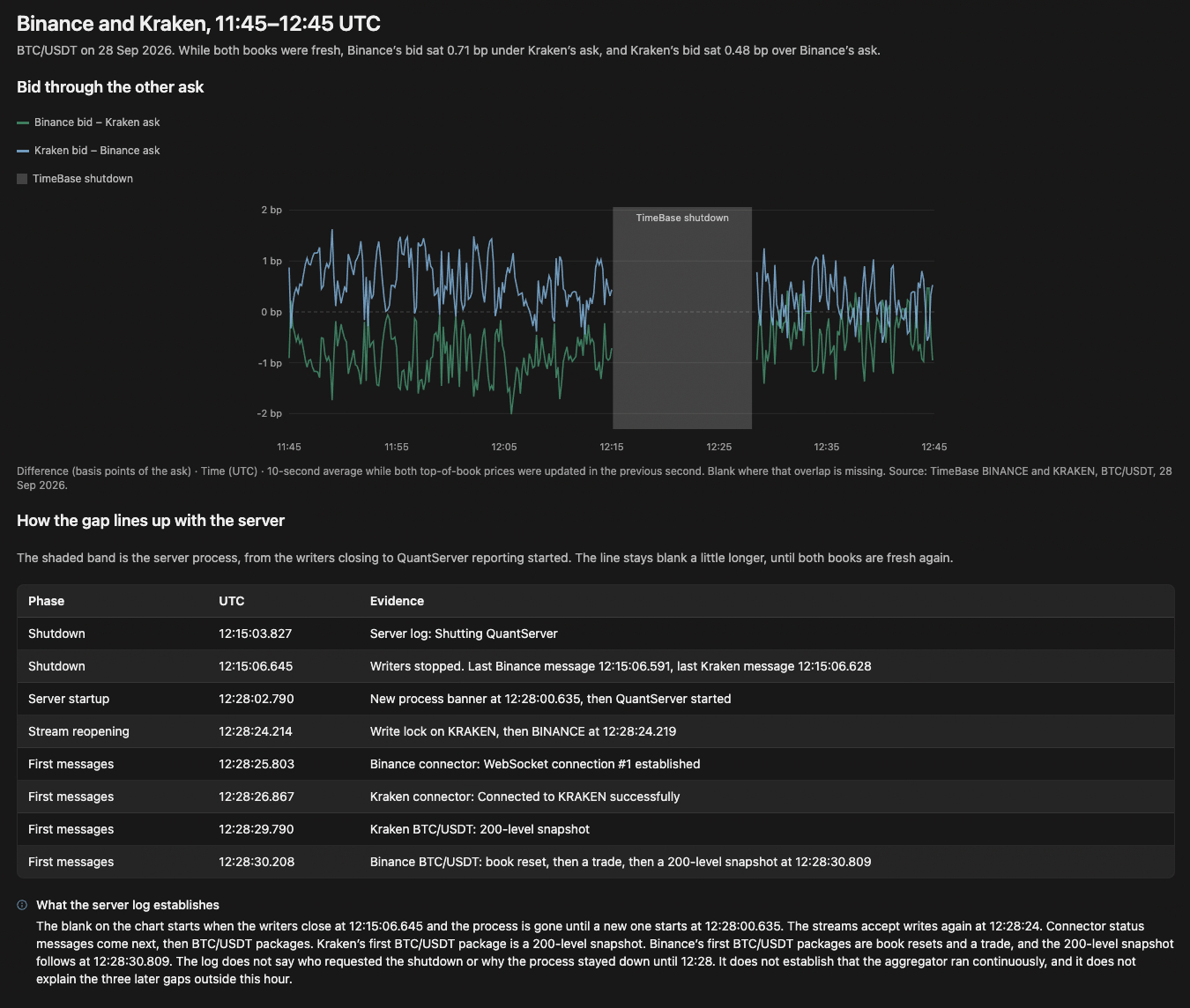
Cursor Canvas for 11:45 to 12:45 UTC. The chart leaves missing observations blank; the timeline separates server startup, stream reopening, and the first returning messages.
2. Build a daily report from the QuickStart sample
The QuickStart shows you how to read messages from TimeBase. Here, the user asked OpenAI Codex CLI to turn its Java reader into a daily market summary they could save as CSV.
I've completed the TimeBase QuickStart. Build a Java command-line tool that produces a daily summary from the bars stream. Let me choose the date and show each symbol's opening price, closing price, daily high and low, total volume, and percentage change. Run it for a date available in my data and save the report as CSV.
Using the plugin's TimeBase Java client skill, Codex built and ran the application against the sample stream.
The application prints the daily summary and saves it as CSV:
| Symbol | Open | Close | High | Low | Total volume | Change |
|---|---|---|---|---|---|---|
| AAPL | 64.78 | 63.32 | 65.11 | 62.60 | 11,644,791 | -2.2538% |
| GOOG | 197.40 | 202.69 | 203.64 | 195.46 | 15,039,659 | 2.6798% |
| IBM | 98.97 | 97.60 | 99.10 | 97.25 | 4,809,300 | -1.3843% |
| ORCL | 13.88 | 13.40 | 13.89 | 13.40 | 55,271,907 | -3.4582% |
QuickStart sample data for January 3, 2005 UTC. Each symbol has 390 consecutive one-minute bars, timestamped 14:30 through 20:59 UTC.
At the user's request, Codex verified the CSV against a second read of the source bars and added timestamps, bar counts, and continuity information.
Sharing the report and its source data
The user then asked Codex to package the source data so another developer could reproduce the report. Using the plugin's TimeBase WebAdmin API skill, Codex exported the day's 1,560 bars as a compressed QSMSG file and checked their counts and time window.
It included the file with the project and wrote instructions for importing it into another TimeBase instance and running the application.
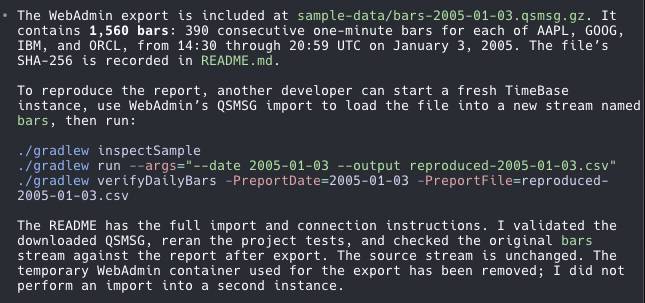
Codex's export confirmation includes the dataset path and commands for inspecting the sample and running the report.
Try it yourself
Install the plugin and start with a question about your data. For a sample environment, follow the QuickStart and adapt the daily-report prompt above.